How to Play
Select a chip of the desired value. This can be done by click on the chip at the bottom right of the game screen.
Place one or several bets. Several clicks on the same pocket will increase bet on the selected chip's value.
To remove a bet, select the "Delete" pin at the bottom right of the game panel, and click on any placed bet. To clear all bets click on the "Clear Bet" button.
Note that it will not be possible to play with no bets placed on the table. It is also possible to delete a bet by mouse click with Ctrl key pressed.
Click on the "Spin" button.
After the ball lands in a randomly selected pocket, a dolly is placed on the winning number on the table.
All bets that do not match the winning number are removed from the table.
If the player has bet on the winning number, he receives win according to the payout table.
Check the winning number. The winning number is displayed in the billboard with information about the type of winning number and the winning (if you have one). Your winnings are also displayed in the game panel and are added to your "Credits" amount. All losing bets are cleared from the table.
To play again, click on the "Same bet" button to place the same bet as in the previous round.
Inside Bets
Straight: a single number. The chip is placed entirely on the middle of a number square.
Split: a bet on two adjoining numbers, either on the vertical or horizontal (as in 14-17 or 8-9). The chip is placed on the line between these numbers.
Street: a bet on three numbers on a single horizontal line. The chip is placed on the edge of line of a number at the end of the line (either the left or the right, depending on the layout)
Corner (or square): a bet on four numbers in a square layout (as in 11-12-14-15). The chip is placed at the horizontal and vertical intersection of the lines around the numbers.
Sixline: a bet on two adjoining streets, with the chip placed at the corresponding intersection, as if in between where two street bets would be placed.
Outside bets
Even Money Bets: a bet on 18 numbers. This is placed in the box representing the attribute (black/red/low/high/even/odd) that you wish to bet on.
Group Bets: a bet on the first, second, or third group of twelve numbers.
Column: a bet on all 12 numbers on any of the three vertical lines (such as 1-4-7-10 on down to 34). The chip is placed on the space below the final number in this string.
Special bets
Special bet is a certain combination of table bets.
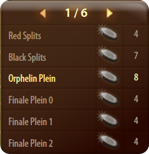
It can be placed via Special Bets Panel, Racetrack, or Billboard.
When you move your mouse over a special bet, the game highlights the bet numbers on the table.
The Special Bets Panel opens when you click on the arrow on the Special Bets bar.
When this panel is open, it lists all special bets available. To scroll through the pages of the special bets list, use the arrows at the top of the panel.
The Racetrack provides an alternative way of betting on the roulette table. The racetrack duplicates the roulette wheel with the same order number.
There are also 4 special bets on the Racetrack:
Neighbors of Zero: this is a name for the numbers which lie between 12 and 15 on the wheel including 12 and 15 themselves.
Serie 5/8: this is the name for the numbers which lay on the opposite side of the wheel between 27 and 33 including 27 and 33 themselves.
Orphans: these numbers make up the two slices of the wheel outside the Serie 5/8 and Serie 0/2/3.
Neighbor bets: a number may be backed along with the 2 numbers on either side of it in a 5 piece bet. For example, "0 and the Neighbors" is a 5 piece bet with 1 piece straight-up on 3, 26, 0, 32 and 15.
Serie 0/2/3: slice of the wheel that lays between 22 and 25, including 22 and 25.
Billboard
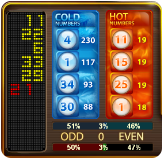
The dynamic Billboard displays content that is changing during the game.
Also, roulette statistics is shown, and user has a possibility to place a bet on "Hot" and "Cold" numbers.
The left part of the Billboard displays the history of the previous 10 winning numbers from your table.
The red colored numbers belong to the red number set, the yellow colored numbers belong to the black number set, and green colored number is the zero.
The right part of the Billboard displays statistics across all of the online Casino's roulette tables for hot numbers, cold numbers, odd, zero, even, red, green, and black numbers.
Hot numbers: hot numbers are numbers that appeared the most frequently, and the number of times they appeared in the last 500 spins.
Cold numbers: cold numbers are the numbers that appeared the least frequently, and the number of spins since the number last won.
Attention: it is possible situation, when one number is present in both "Hot" and "Cold" category.
Red/Black/Green numbers: displays number of times (as a percentage) a red, black or green number has been drawn in the last 500 rounds.
Odd/Even/0 numbers: displays the number of times (as a percentage) an odd, even or zero has been drawn in the last 500 rounds.
Attention: all Billboard statistics are updated at the end of each game round when the winning number is presented.
Zero is neither Odd nore Even number.
Game Settings
To open "Game settings" menu, click on the spanner icon at the top of the screen.
It is possible to set up the following settings:
Sound effects - turn sound on/off.
Fast play option: make animation of the wheel shorter .
Special bets: open "Special bets" screen and keep it opened (Checkmark means screen is kept open).
Also, it is possible to turn Sound effects on/off by click on the button at the top of the screen.